Fine Art Print, News
What’s the Largest print can make from an iPhone photo – updated 2023
>閱讀中文版本
Apple release new iPhone models every year, we’ve found the image quality taken by iPhone camera keep improving. As a Fine Art Printer, we keep hearing the same question: “What’s the largest print I could make from an iPhone photo?”
In fact, many people are using iPhone as their day to day camera now. Currently their latest model can take a raw image up to 48MP. In here we will focus on the default 12MP size we can get from any iPhone regardless which model you are using. The way it works can be applicable to other android phone and digital camera.
Old photos before upgrade to new iPhone
“I have many photos in my phone taken by different iPhones in the past, do I need to know the photo taken by which iPhone?”
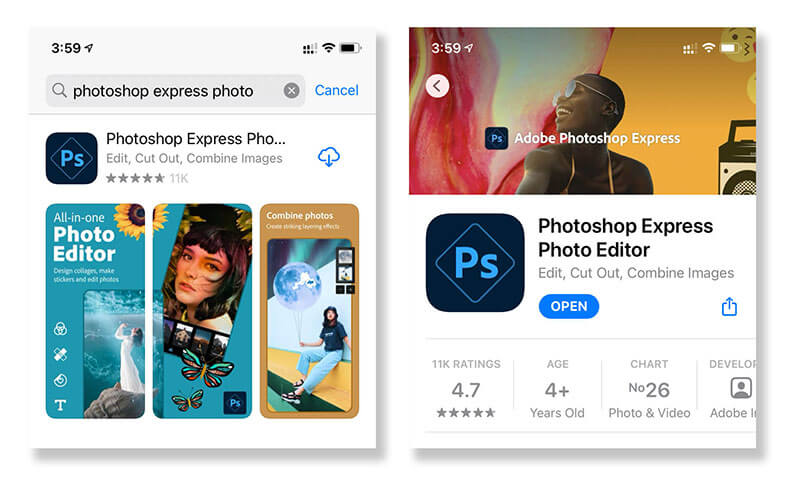
No, we do not need to worry about which iPhone was used when the photo was taken. There is a “free” tool to help. If you are serious about photography, most likely you already have Photoshop Express Photo Editor installed in your phone. If not, just go to App Store to grab it.
Allow access to All Photos
Once the app is downloaded and installed in your iPhone, you can open Photoshop Express, don’t forget to choose “Allow access to All Photos” to easily access and edit your phone images.
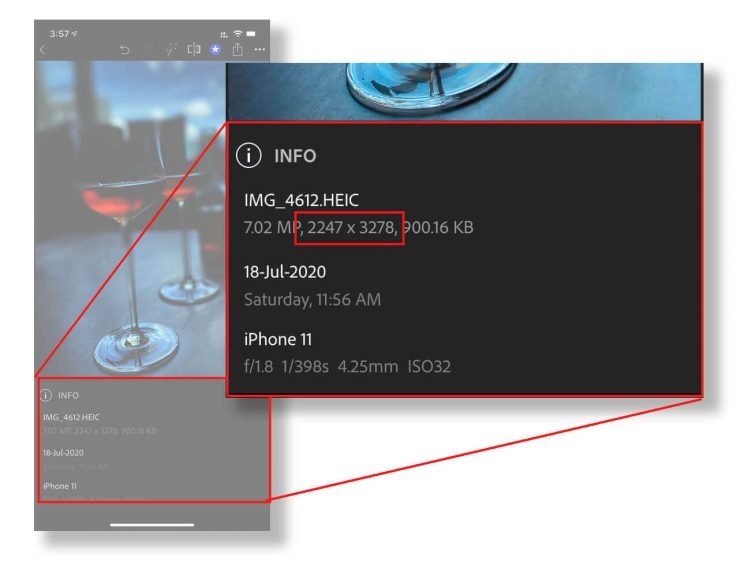
After an image is opened, select the 3 “white dots” to open a dialog box. This will give you further options. Then we can select “Show Info” to see more information about the photo.

Check the number of pixels of your photo (W x H)
After “Show Info” is selected, additional information of the photo will be show on the bottom. In this example, we can see the photo file size is 7.02MP. However, the most important information is the dimension of the photo, here we know it is 2247 x 3278 pixels.
Update on latest iPhone 14, the rear camera takes much larger image as large as 48MP raw format, but we will use the default 12MP (4032 x 3024 pixels) here as an example.
What is the largest print we can make from the photo without loosing in picture quality?
In most of the photo applications, we determine the print quality by “Pixel Per Inch” or “ppi”. In general we do not recommend the resolution go lower than 240 ppi, which will give you a very decent Fine Art Print quality. With this resolution, it is within an arm length print appreciation distance.
Update – Using the default 12MP photo (4032 x 3024 pixels)
As we are using the default 12MP resoulution, the photo short side and long side are as much as 3024 pixels and 4032 pixels respectively. We can go ahead to divide 3024 and 4032 by 240 ppi, and obtain the print dimension in inches.
Now we know we can create a 12.6 x 16.8″ (~32 x 42.5cm), which is A3 paper size print at 240 ppi Fine Art Print quality.
The size seems smaller than I wanted, can it be larger?
The answer is “Yes”, you can print larger than this size, as long as you change your viewing distance for appreciation. This is similar concept of buying a TV in your living room. The longer distance between your sofa and TV, the larger TV you can choose. The Photo Prints are similar, the longer distance for appreciation you allow, the larger print you can create.
The recommended ppi verse viewing distance
The ideal resolution (ppi) of your print depends mostly on how far away the print is from the viewer. Here’s a chart to show you what resolution to aim for when creating your print.
| Viewing Distance | Pixel Per Inch |
|---|---|
| 0.6m / 2ft | 240 ppi |
| 1m / 3.3ft | 180 ppi |
| 1.5m / 5ft | 120 ppi |
| 2m / 6.5ft | 80 ppi |
| 3m / 10ft | 60 ppi |
| 5m / 16ft | 30 ppi |
| 10m / 33ft | 15 ppi |
| 15m / 50ft | 12 ppi |
| 50m / 160ft | 4 ppi |
| 60m / 200ft | 3 ppi |
| 200m / 650ft | 1 ppi |
This is applicable to all digital photos, taken by any camera, including DSLRs or Mirrorless digital cameras
We hope you can find this post useful, we will continue to publish more articles like this, please come back to visit from time to time for more imaging or application tips.
We are specialise in Fine Art Photo Printing
If you would like to know more about our Fine Art Print and Paper, you are welcome to check or Fine Art Paper & Photo Prints pages.
There are many tools available for us to check the information we need. Just a few clicks might save you lots of time in searching specifications online. Hope this post could help you. If you would like to receive more tips and news, there is a subscription form on the bottom footer to enter your email address to subscribe.
iPhone 照片的最大打尺寸是多少? – 2023 年更新
蘋果每年都會發布新的 iPhone 機型,我們發現 iPhone 相機拍攝的相片質量不斷提高。 作為 Fine Art Printer,我們不斷聽到同樣的問題:
“可以從 iPhone 照片中打印出的最大尺寸是多少?”
事實上,現在很多人都在使用 iPhone 作為他們的日常相機。 目前他們的最新型號可以拍攝高達 48MP 的原始相片。 在這裡,我們將專注於我們可以從任何 iPhone 獲得的 12MP 打印尺寸,無論您使用的是哪種型號。 它的工作方式可以適用於其他安卓手及數碼相機。
升級到新 iPhone 之前的舊照片
“我的手機裡有很多以前用不同的 iPhone 拍的照片,我需要知道哪一張是那款 iPhone型號拍的照片嗎?”
不需要,我們無需擔心拍攝照片時使用的是哪款 iPhone。 有一個“免費”工具可以提供幫助。 如果您對攝影有很大興趣,很可能您的手機中已經安裝了 Photoshop Express Photo Editor。 如果沒有,只需去 App Store 獲取下載。
允許訪問所有照片
將應用程序下載並安裝到您的 iPhone 後,您可以打開 Photoshop Express,不要忘記選擇 “允許訪問所有照片” 以輕鬆選擇和編輯您的照片。
打開照片後,選擇 3 個“白點”打開一個對話框。 這將為您提供更多選擇。 然後我們可以選擇“Show Info” 顯示信息以查看有關照片的更多資訊。
檢查照片的像素(寬 x 高)
選擇“Show Info”後,照片的附加信息將顯示在底部。 在本例中,我們可以看到照片文件大小為 7.02MP。 但是,最重要的信息是照片的尺寸像素,這裡我們知道它是 2247 x 3278 像素。
在最新的 iPhone 14 上,後置攝像頭可拍攝的默認 12MP(4032 x 3024 像素)作例子。
在不損失相片質量的情況下,我們可以從照片中打印出最大的照片是多少?
在大多數照片應用程序中,我們通過“每英寸像素”或 Pixel Per Inch (ppi) 來確定打印質量。 一般來說,我們不建議分辨率低於 240 ppi,這將為您提供非常不錯的 Fine Art 打印質量。 有了這個分辨率,它就在我們拿在手上作欣賞距離之內。
使用默認 12MP 照片(4032 x 3024 像素)
我們知道, 雖然最新的 iPhone 型號相機具有 48MP raw 格式, 但方便起見,我們以默認 12 MP 分辨率作例子計算,照片短邊和長邊分別高達 3024 像素和 4032 像素。 我們可以繼續將 3024 和 4032 除以 240 ppi,並獲得以英寸為單位的打印尺寸。
現在我們知道我們可以創建 12.6 x 16.8″ (~32 x 42.5cm) 的 A3 紙張尺寸打印件,240 ppi Fine Art Print 打印質量。
尺寸似乎比我想要的要小,可以打印大一些嗎?
始終打印的理想分辨率 (ppi) 主要取決於打印與欣賞相片的距離。 以下這張表格,可以提供給您一些建議,去決定打印相的分辨率。
就觀賞距離所建議的分辨率 Pixel Per Inch
| Viewing Distance | Pixel Per Inch |
|---|---|
| 0.6m / 2ft | 240 ppi |
| 1m / 3.3ft | 180 ppi |
| 1.5m / 5ft | 120 ppi |
| 2m / 6.5ft | 80 ppi |
| 3m / 10ft | 60 ppi |
| 5m / 16ft | 30 ppi |
| 10m / 33ft | 15 ppi |
| 15m / 50ft | 12 ppi |
| 50m / 160ft | 4 ppi |
| 60m / 200ft | 3 ppi |
| 200m / 650ft | 1 ppi |
這適用於任何相機拍攝的所有數碼照片,包括數碼單反相機或無反光鏡數碼相機
有許多工具可供我們檢查我們需要的信息。 只需點擊幾下,就可以為您節省大量在線搜索規格的時間。 希望這篇文章能幫到你。 如果您想收到更多提示和新聞,底部頁腳有一個訂閱表格,輸入您的電子郵件地址進行訂閱。
如果您想了解更多關於我們的 Fine Art Paper 和 Photo Prints ,歡迎您查看以下頁面連結。
